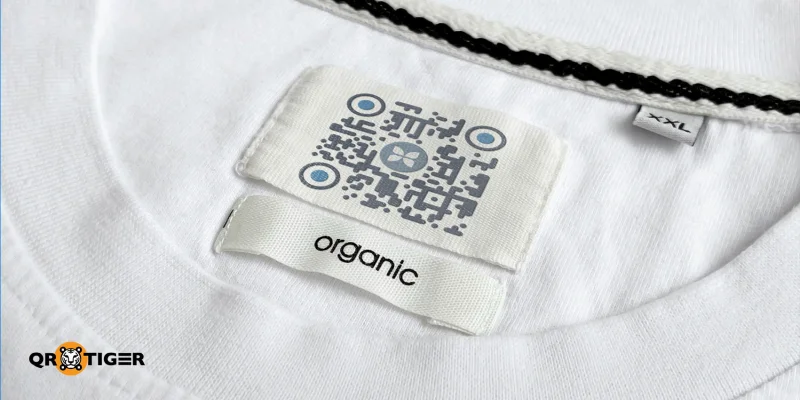
QR codes on clothing connect garments to digital content, such as care instructions, product details, and authenticity checks. A QR code T-shirt has a code printed as part of its design, which people can scan to open a playlist, event page, donation form, or personal message.
To use one, determine what people should see after scanning, generate a QR code, and print it on a clothing label or directly onto the fabric. Its size, placement, and contrast affect how easily people can scan it, especially when the material folds or stretches.
Clothing labels have limited space for product details beyond the essentials. By adding a QR code on clothing labels or hang tags, apparel brands can give additional information that shoppers can access before or after purchasing a garment.
In QR TIGER's QR Decoded 2026 survey findings, 65% of respondents selected products and stores as places they usually scan QR codes, while 40% selected product information as a reason for scanning.
A QR code on a clothing tag can lead to a product page showing available sizes, composition, colors, fabric, and other details that might not fit on the label.
For care instructions, brands can link to a PDF guide or a short video explaining how to wash, dry, iron, or store certain materials.
The digital guide can supplement the physical care label, but it doesn't automatically replace information required under applicable labeling rules.
Tell the story behind the clothing
Brands can use QR codes to show how garments were made or designed.
The linked page could include sketches and an inspiration board for a collection, footage of fabric sourcing, or information about the people involved in production and the techniques they use.
For sustainability or sourcing claims, brands should provide supporting details, such as supplier information or relevant certifications.
Verify product authenticity
QR codes on clothing tags can help buyers check whether a garment is genuine through a trusted product verification system.
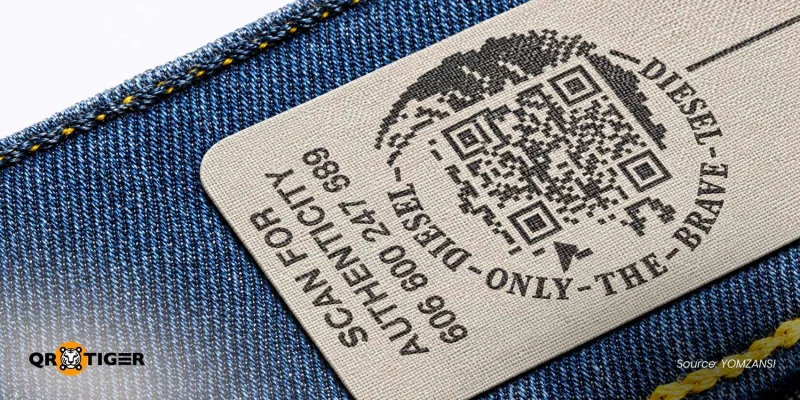
Diesel, for example, uses QR codes and 12-digit identification codes on eligible product labels. Customers can use these details through Certilogo to verify Diesel purchases.
A printed QR code alone, however, doesn't prove authenticity. The verification depends on the system behind it, since the visible code can be copied onto counterfeit products.
Offer styling advice
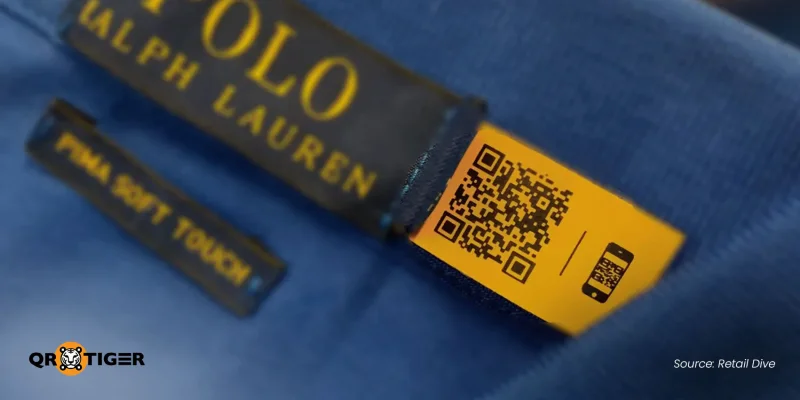
Ralph Lauren's digital product ID initiative, introduced in 2019, included product details and styling recommendations that customers could access by scanning QR codes on clothing labels.
A clothing tag can also lead to a styling video or an outfit guide showing how to pair different pieces. Scanning a blazer's label, for instance, could open a short video that shows how to wear it for work or casual occasions.
Fashion brands can use QR codes on garment labels to connect certain pieces with collection launches, exhibitions, or special offers.
In 2016, Rochambeau's BRIGHT BMBR jacket featured a hidden sleeve pocket containing a label with a QR code and NFC technology. The label gave owners access to curated art, retail, dining, and fashion experiences.
A QR code on a clothing label can direct customers to a short feedback form where they can share their thoughts about the garment's fit, fabric, or overall quality.
Brands can also link their online profiles using a Link Page QR code (also called a social media QR code) or invite customers to share photos of how they style their purchases.
QR code T-shirt design ideas
On a T-shirt, the code isn't tucked inside a collar. It sits on the front or back, where strangers see it. They can lead people to a business, campaign, or digital experience.
Businesses can print QR codes on staff uniforms or promotional T-shirts to direct people to their products, social media accounts, or services.
At a trade show, a QR code on a shirt could open a product demonstration, company website, or registration form. A local shop could also use the same approach to guide people to its latest collection or online store.
Awareness and fundraising campaigns
An environmental group could add QR codes on campaign shirts that link to educational materials, cleanup schedules, or volunteer registration forms.
For fundraising events, the code might open an official donation page or provide updates on how contributions are being used.
If the campaign runs over several months, organizers can also use a dynamic QR code to update the destination as new activities or information become available.
Interactive fashion and fan merchandise
A QR code T-shirt design can include digital artwork, music, videos, or other content that adds to the garment's visual concept.
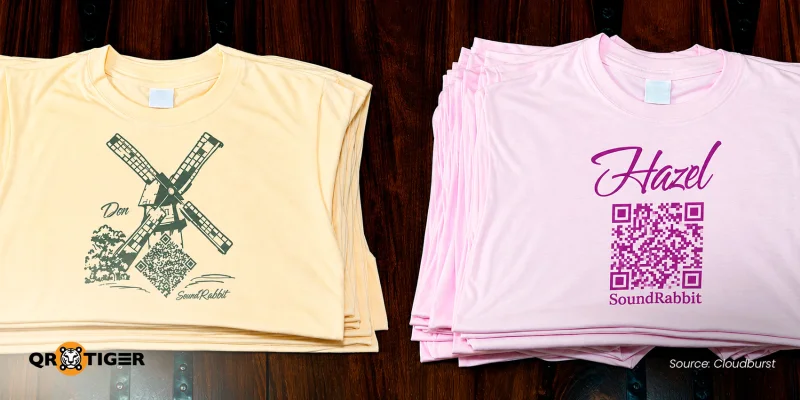
In 2011, Cloudburst Design Studio created QR code T-shirts for the band SoundRabbit. Scanning the printed codes gave people access to free downloads of the band's songs.
Other QR code merchandise can link to new releases, behind-the-scenes footage, or exclusive creative work for fans.
Personal messages and self-expression
People can also use them to share their interests, artwork, or personal messages. Someone could design a shirt that opens a favorite playlist, photography portfolio, or digital greeting.
A dynamic QR code also lets you change the playlist or message later without reprinting the shirt.
Since the shirt may be scanned in public, it's best to avoid linking to private accounts or content that isn't intended for strangers. 
How to create a QR code for clothing and T-shirts
To create a QR code for clothing labels or T-shirts, use a generator like QR TIGER that lets you customize the design and download it for printing.
1. Open a QR code generator
Go to QR TIGER, a dynamic QR code generator that supports different content types and design options.
2. Choose a QR code solution
Select a URL QR code for a product page, website, or campaign link. You can also choose File for a PDF care guide, the Video QR solution for a styling clip or brand footage, or a Link Page QR code for social media profiles. Enter the required details or upload your file.
3. Select static or dynamic QR type
For a URL code, choose static or dynamic QR code: static if the link will remain the same, or dynamic if you want to change the destination after the code is printed or track scans. Some solutions, like File QR code, are available only as dynamic codes.
QR TIGER's free plan includes three dynamic QR codes with 500 scans each. Once a code reaches its limit, it stops redirecting. Free dynamic codes also display QR TIGER's logo pop-up when scanned.
If you're printing shirts for an ongoing campaign or a large event, check the limits of your chosen plan before production.
4. Generate and customize your QR code
Click Generate QR code or Generate dynamic QR code, depending on the solution.
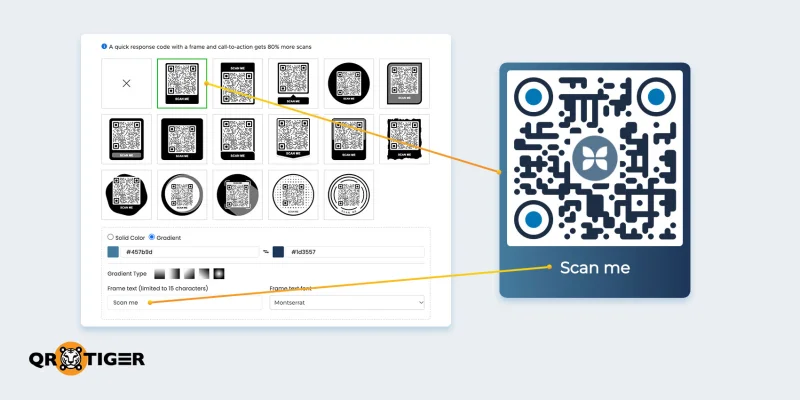
Adjust the colors, patterns, eyes, and frame. You can also upload your brand mark to create a QR code with logo.
5. Test the QR code
Scan the preview using a smartphone to confirm that it opens the intended page or file. Check the destination's access permissions, especially if you're linking to content hosted on another platform.
6. Download your QR code
Choose SVG for a scalable design that can be resized for clothing tags or T-shirt prints without pixelation. PNG is also available. Save the file and prepare it for your chosen printing method.
Tips for printing QR codes on shirts and clothing labels
A QR code that works on a screen may not scan as easily once it's printed on fabric. Fabric folds when you sit, stretches across your chest, and fades in the wash. Any of these can break a code that scanned fine on screen.
Choose the right size and placement
The size of the code should depend on how far away people will scan it. A clothing tag can be held close to a phone, while a QR code on a shirt may need to be readable from a greater distance.
For clothing tags scanned up close, start with at least 2 × 2 cm (0.8 × 0.8 in) and test the code on the actual label.
For shirt designs, around 10 cm (4 inches) wide is a practical starting point for scans from roughly one meter away. This follows a common QR code size guideline of making the code roughly one-tenth of the scanning distance. Larger codes may be necessary for longer distances, while smaller ones need closer testing.
The center chest or upper back can offer relatively flat printing areas. Avoid seams, pockets, and parts of the garment that frequently bunch up or stretch, as these can distort the code when worn.
Keep the design readable
You can look into creative QR code design options, including colors, patterns, and logos that match your clothing design, but the code's main scanning elements must remain recognizable.
Dark patterns against a light background generally work best. If you're printing on a black or dark-colored shirt, add a light background behind the code rather than relying on white QR patterns directly against the fabric.
Static URL QR codes store the full link, so longer URLs can produce denser patterns that are harder to print clearly on small labels. Dynamic codes typically use shorter redirect links, which can make the pattern simpler.
Leave a clear margin, called the quiet zone, around all four sides of the code. For a standard QR code, this margin should be at least four modules wide. Keep artwork, text, and decorative elements outside it.
An image or logo can be placed in the center, provided it doesn't obscure too much of the pattern.
Select a suitable fabric printing method
How you print QR codes on a T-shirt affects how clearly the small squares appear and how well the design holds up with use.
Common methods include:
- Screen printing: Suitable for larger batches and simple designs. Proper ink application is important to prevent fine details from filling in.
- Direct-to-garment (DTG): Prints ink directly onto the fabric and works well for smaller runs or detailed artwork. Check that the QR code's edges remain distinct.
- Direct-to-film (DTF): Prints the design onto a transfer film before applying it to the garment with heat. It can reproduce detailed patterns on different fabrics.
- Heat transfer vinyl: Useful for individual shirts or small projects, although cutting and removing excess vinyl around tiny QR code squares can be difficult.
Ask your printer for a test print on your chosen fabric. Check its size, contrast, and placement against best practices for printing QR codes, then scan the sample before full-batch production.
Add a clear call to action
Few people scan a bare code on a stranger's shirt. A few words beside it tell them why they should.
Match the instruction to the purpose of the garment:
- Clothing label: "Scan for care instructions"
- Campaign T-shirt: "Scan to support the cause"
- Band merchandise: "Scan to hear our music"
- Event shirt: "Scan to register"
A small frame or your brand's logo can help the QR code fit the clothing design. Just keep the call to action outside the code's clear margin so it doesn't interfere with scanning.
Test the QR code before and after washing
Before printing multiple garments, make a sample and test the QR code by scanning it using different smartphones. Determine if the code opens the correct destination at the distance and lighting conditions you expect people to use.
Don't test only while the fabric is flat. Have someone wear the shirt and scan it while standing or sitting to see whether folds or stretching affect readability.
Wash and dry the sample according to its care instructions, then test it again. Fading, cracking, peeling, or ink spreading may make parts of the code difficult to recognize.
If scanning becomes inconsistent, adjust its placement, contrast, or printing method before approving the final design.
Create QR codes for clothing and T-shirts with QR TIGER
Decide what someone should find when they scan a QR code before printing it on clothing. A care label might open washing instructions, while a campaign T-shirt could lead to an event page.
Once the destination is ready, use QR TIGER to create and customize the code, then test a sample on the actual garment.
For brands creating different codes for multiple product labels, bulk QR code generation on Advanced and Premium plans lets you create up to 3,000 codes per batch from a CSV file.