
商品を購入したり、プロモーションを利用したり、予約をしたり、QR コード経由でリンクにアクセスしたりしたことがありますか?
QR コードの行動喚起のベスト例: コンバージョンを促進
 に Belle
 Reviewed by Edrian Ostulano, PR, Communications, Influencer Marketing Manager


動画広告は、ビジネスの話題を生み出すために使用できる戦略の 1 つです。
2021 年には、60% の企業がブランドを宣伝するために動画を使用していると報告されています。
一方、マーケティング担当者の 94% はビデオも継続的に使用していると回答しています。
これは主に、ビデオにより、より早く、より視覚的に魅力的な方法で、製品やサービスについて簡単に情報を提供し、宣伝できるためです。
また、動画マーケティングの取り組みをアップグレードするために、行動喚起を促す動画 QR コード ソリューションを作成できます。
それはさらに優れた戦略です。競合他社との差別化を図ることができます。
「」のようなキャッチラインを使用できます。ここで視聴してください" または "ここでプレビューをご覧ください映画やシリーズを宣伝する場合は、「」を使用することもできます。スキャンしてトレーラーを確認します」
関連している: 5 ステップでビデオ QR コードを作成: スキャンでビデオを表示
3. ブランドの販売およびプロモーションのため
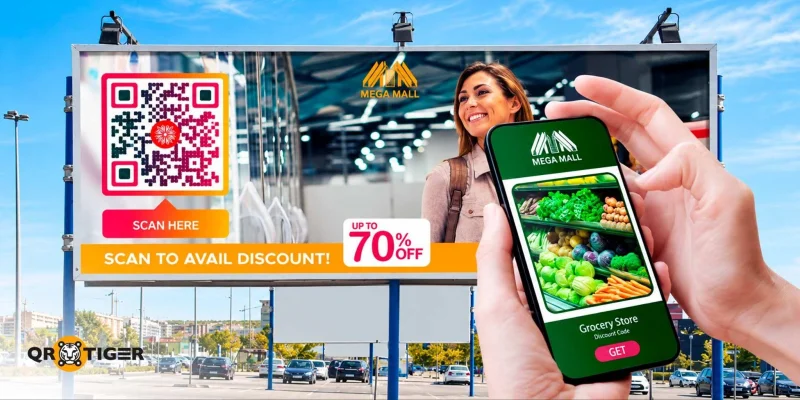
QR コードと行動喚起を統合することで、割引マーケティングの取り組みを最大限に活用することもできます。
これにより、顧客はマーケティング資料を簡単に見つけて、スキャンするだけでプロモーションを利用できるようになります。
また、CTA 用のキャッチーなフレーズを考える必要さえありません。単純な「」を使用できます。割引!」を販促資料に大きく太字で印刷します。
または「」を使用してみてくださいスキャンしてクーポンを取得します、””ここで20%オフを入手してください、" または "サマーセールをスキャンしてください」をQRコードに貼り付けてください。
割引マーケティングにおける CTA は、顧客がより安い価格で最高の取引を得ているという考えを強調します。そして、割引戦略が成功すれば、お店の売上も伸びることになります。

4. Web サイトのリダイレクトの場合
適切な行動喚起を使用して、ターゲット ユーザーが Web サイトの QR コードを認識しやすくします。
オンライン予約システムにリダイレクトしたい場合は、「」を追加してみてください。席を確保してくださいURLのQRコードに「」を付けてください。
または、製品やサービスに関するフィードバックを収集したい場合は、シンプルな「私たちを評価してください、””スキャンしてフィードバックをお寄せください。" または "考えを共有する」はあなたのものより良く見えるでしょう URL QRコード 運動。
オンラインショップの顧客数を増やしたい場合は、「」を使用できます。ここで入手してください、””スキャンして買い物、" または "ほしい物リストに追加する」スキャンが完了すると、手間をかけずに視聴者をすぐに e コマースにリダイレクトできます。
5. ファイルへのアクセスとダウンロードについて
PDF、プレゼンテーション スライド、スプレッドシート、その他のファイルへのゲートウェイとして QR コードを使用すると有利です。
このデジタル ツールを使用すると、大きなスペースや追加のページを占有することなく、より多くの詳細やコンテンツを追加できます。
著者と出版社にとって、これは特に有益です。
「」を追加できます。ここから電子書籍をダウンロード" または "今すぐコピーを入手してください」を QR コードに追加してエンゲージメントを高めます。
ファイルの QR コードは、いつでも簡単にアクセスしてダウンロードできるため、ユーザーに便利です。
関連: ファイル QR コード コンバーター: スキャンでファイルを共有
6. アプリのダウンロードについて
モバイル マーケティングでは、できるだけ多くのユーザーを獲得し、維持することが重要であるということです。
QR コード技術を使用して、モバイル アプリのダウンロード数を増やすのが簡単になりました。
任意のアプリ マーケットプレイスからアプリのリンクを App Store の QR コードに埋め込むだけで、便利なリダイレクトが可能になります。
しかし、プロセスはそこで終わりません。 QR コードのフレームに魅力的な CTA を必ず配置してください。
「」などのCTAを追加するアプリの入手はこちらから" または "スキャンしてダウンロードする」は完全なゲームチェンジャーです。
視聴者が QR コードをどうすればよいかを理解できるようにするだけでなく、アプリからのインストール数を確実に増やすこともできます。
これにより、視聴者が QR コードをどうすればよいかを理解できるようになり、同時にアプリのダウンロード数も確保できます。
7. ニュースレターの購読について
QR コードを使用してメーリング リストを増やすことができます。 1 回のクイック スキャンで、ユーザーは即座にニュースレターにサインアップできます。
用途を何も示さずにランダムな QR コードを表示するだけでは十分ではありません。
QR コード CTA を含めて、ニュースレターの購読者をさらに増やしましょう。
「」を雇用することができます。サインアップしてください" または "週刊ニュースレターに登録するQRコードフレームに「」を追加してください。
8. デジタル名刺の場合

を使用して名刺を簡単にデジタル化できるようになりました。vCard QRコードQR TIGER のソリューション。
QR コード付きのデジタル名刺を使用すると、連絡先の詳細を QR コードに保存し、接続先で即座に表示およびダウンロードできるようになります。
ユーザーが QR コードを使用してアクションを起こすことを保証するには、そのフレームに CTA を追加します。
「」のような魅力的なCTAを入れてください。スキャンして接続する、””電話してください」 または "連絡先の詳細をスキャンしてください」
9. カスタムランディングページのリダイレクトの場合
自分の Web サイトへの投資には懐疑的だが、プロモーション用にカスタマイズ可能なランディング ページが必要な場合は、H5 エディターの QR コードが最適です。
このツールを使用すると、ホスティング ドメインの料金を支払わずに HTML ページを作成できます。
エディター インターフェイスには、ドラッグ アンド ドロップ方法でランディング ページを作成するオプションがあります。コードも使用できるようになります。
「」のような CTA を使用して顧客の注意を引きます。スキャンして詳細を確認する」を使用して、マーケティング キャンペーンに参加者を引き込みます。
10. Wi-Fi アクセスの場合
ビジネスの専門家は、無料の Wi-Fi アクセスは今日のサービスベースのビジネスの最も強力な資産の 1 つであると主張しています。
顧客やクライアントは、無料インターネットを提供する施設に長く滞在することを好みます。
そして、滞在期間が長ければ長いほど、あなたの製品やサービスにより多くのお金を費やすことになります。
たとえば、ゲストに Wi-Fi アクセスを提供するホテルは、顧客が長期滞在し、無料オファーにより多くのサービスに料金を支払う傾向があるため、収益が増加する可能性があります。
この戦略を最大限に活用するには、最高の QR コード ジェネレーターを無料で使用して WiFi QR コード ソリューションを生成します。
シンプルなアクションのような魅力的なコールトゥアクションで最適化できます。「無料Wi-Fi」" または "無料Wi-Fiをスキャン」
11. 非営利活動の登録について
非営利団体は、CTA を使用して QR コードを作成することもできます。
QR コードを通じて活動を効果的に宣伝し、エンゲージメントとボランティアを増やすことができます。
社会擁護グループは、Google フォームの QR コードを生成し、関心のある参加者やボランティアを募金活動のオンライン登録フォームに簡単にリダイレクトできます。
キャッチ?費用対効果が高いです。支出を減らす (またはまったく支出しない) こともできますが、プロモーション キャンペーンを最大限に活用できます。
CTA として、「」のようなキャッチーなフレーズを忘れずに含めてください。ここに登録」を Google フォームの QR コードに入力してください。
行動喚起を含む QR コードを作成する方法
すべてのデジタル マーケティング担当者に朗報です。QR TIGER を使用して、CTA を含む QR コードを無料で生成できるようになりました。
さらに嬉しいことに、この無料オファーを利用するために面倒な登録プロセスを行う必要はありません。
電子メール アドレスを入力するだけで、無料の QR コードのコピーを受け取ることができます。
はい、それはそれ安全な。
当社の専門的なカスタマイズ ツールを使用して、QR コードを自由にカスタマイズできます。 CTA を追加したり、テンプレートにある CTA を使用したりすることもできます。
QR TIGER のソフトウェアを使用すると、スムーズな QR コード生成プロセスが保証されます。その方法は次のとおりです。
1. QR TIGER に移動し、作成する QR コード ソリューションを選択します

QR TIGERでは17種類の高機能QRコードソリューションからお選びいただけます。
無料の QR コードを作成する場合は、選択した 9 つの静的 QR コードまたは 3 つの動的 QR コードのみを使用できます。
静的 QR コードには有効期限がなく、無制限のスキャン機能があることに注意してください。
一方、動的 QR コードは、アクティブなサブスクリプション プランに応じて実行されます。マーケティング キャンペーン用に編集可能で追跡可能な QR コードが必要な場合は、これが最善の策です。
2. 必要なデータを埋め込み、QR コードを生成します
ここで、静的 QR コードまたは動的 QR コードを選択します。
無料トライアルでは、静的 QR コードの生成を試すことができます。
ただし、その機能を確認したい場合は、 ダイナミックQRコード, 無料トライアルでは 3 つの QR コード キャンペーンを生成できます。
3. カスタマイズ ツールを使用して QR コードをカスタマイズする
ここで、QR コードの外観、つまりパターン、目、色を変更できます。 QR コードにフレームや行動喚起を追加することもできます。
CTA を作成することも、テンプレートのいずれかを使用することもできます。
4. スマートフォンを使用してテストスキャンを実行し、エラーを確認します
5. QR コード画像をダウンロードし、マーケティング資料に展開します。
キャッチーな QR コード CTA マーケティングを使用するブランドと企業
ブランド マーケティングに対する人々の見方を再定義した 3 つの QR コード CTA の例を次に示します。
ロレアル パリのバーチャル メイクアップ試着
化粧品ブランド「ロレアル パリ」が導入した バーチャルメイク試着 QRコードの助けを借りて。
メイクアップ ブランドのファンは、ロレアルの実店舗に行かなくても、ファンデーション、ブラッシュオン、口紅などを試すことができるようになりました。
マーケティング資料に表示されている QR コードをスキャンすると、すぐにオンライン プラットフォームにリダイレクトされ、自分に最適な化粧品の色合いを確認できます。
EmartのSunnyセールマーケティング戦略
韓国の Emart は、QR コードを使用してビジネスのダウンタイムを解決する方法を見つけました。
しかし、ただの普通の QR コード キャンペーンではありません。
屋外イベントを活用した「サニーセール」キャンペーンを開始した。 シャドウQRコード 正午から午後 1 時まで機能します。
つまり、QR コードは昼休みにのみスキャン可能であり、昼休みは E マートの最も非アクティブな時間でもあり、そのプロセスにおける売上と顧客エンゲージメントが向上します。
ヴィクトリアズ・シークレットの「肌よりセクシー」キャンペーン
ヴィクトリアズ・シークレットは、 Sexier than Skin QRコードキャンペーン。
この有名なランジェリー ブランドは、新しくリリースされた商品をカバーするために QR コードを使用しています。これは、市場の好奇心をそそり、刺激する賢い方法です。
看板に表示されているQRコードの表紙をスキャンすることで、ランジェリー作品を閲覧できます。
今すぐ QR TIGER で行動喚起を含む QR コードを生成してください
最近の QR コード使用統計によると、今年の第 1 四半期の QR コード スキャン数は 443% 増加しました。
QR コードに CTA を追加すると、コンバージョン率とエンゲージメントの増加も保証できます。
ユーザーフレンドリーなインターフェイスを備えた最高の QR コード ジェネレーターである QR TIGER を使用すると、最適化されたキャンペーンのために QR コードに CTA を簡単に追加およびカスタマイズできます。
当社では、最も高度な QR コード機能の 1 つ、包括的な QR コード カスタマイズ ツール セット、スマートなプラン、価格設定を備えており、マーケティングに役立ちます。

免責事項
この記事は一般的な情報提供を目的としており、法的、財務、その他の専門的な助言を構成するものではありません。QR TIGERの製品やサービスに関するご質問については、弊社サポートチームまでお問い合わせください:it@qrtiger.com。
よくある質問(FAQ)
Does every QR code need a call to action?
Not always. A QR code that’s placed where its purpose is already obvious (like a payment QR code on a store counter) does not necessarily need a CTA. A CTA is best used where the setting doesn’t explain the code’s purpose.
Should my call to action be in my customers’ language?
Yes. A CTA only works if people can read it at a glance, so writing in your customers’ language is a must. For tourist spots or multilingual areas, you can also make a short, two-language CTA like “Scan for the menu/Escanea para el menú” and place it beside the code to cover both groups.
Can I change my QR code’s call to action after printing?
No. When you edit a digital design, such as the CTAcall to action, it will not affect the printed copies. This means that if you plan to change the call to action after printing, you will still need to reprint the QR code.
Does adding a CTA frame affect how the QR code scans?
No, as long as the frame sits outside the code itself. Keep the quiet zone, the blank border around the QR code, clear of text and graphics, and always run a test scan before printing.
How can I tell if my QR code call to action is working?
Check the scan count of your dynamic QR code and what people do after they scan it (e.g., purchases, sign-ups, etc.). If you want to test the wording itself, you can create two dynamic QR codes that both lead to the same page but with different CTAs. Place them in similar areas, then compare scans and completed actions for each.
この記事は役に立ちましたか?
最高のQRコードジェネレーターでスキャンを最大限に活用してください。
数千のグローバルブランドが、動的ルーティング、一括作成、および深い帰属分析を管理するためにQR TIGERを使用しています。
無料で始める