
QR Code Call to Action: How to Write One People Will Scan
 By Belle
 Reviewed by Edrian Ostulano, PR, Communications, Influencer Marketing Manager
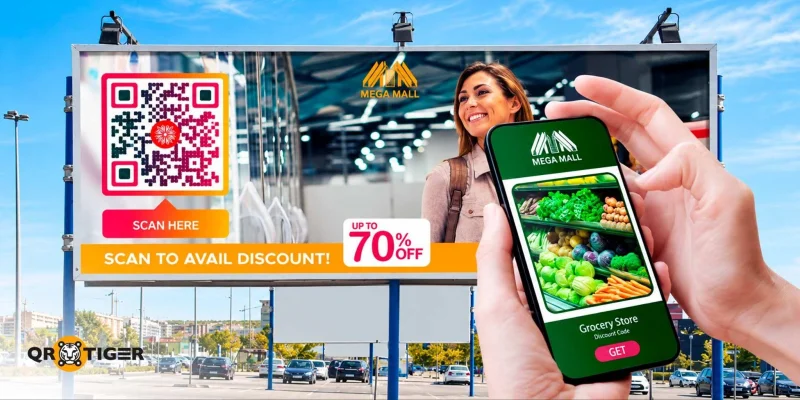
A QR code call to action (CTA) is the short line of text near or around a QR code that tells people what they will get when they scan it.
To write a QR code CTA that encourages scans, use clear, action-oriented language that explains the benefit, such as “View the menu.” Match the CTA to the QR code’s destination so people know what to expect before scanning.
Key takeaways
|
Why does a QR code need a call to action?
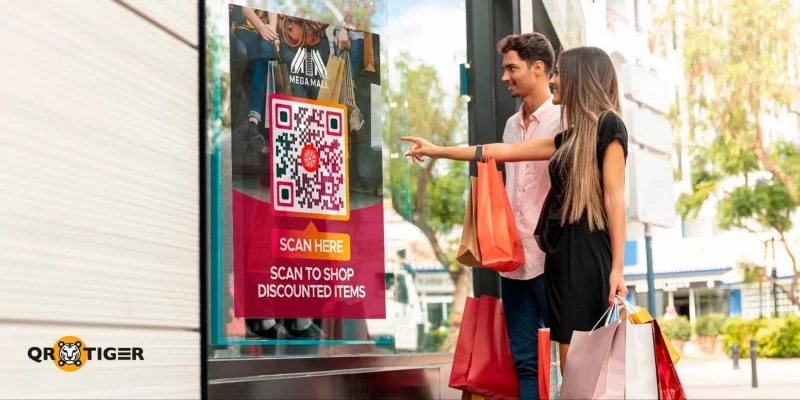
Chapter 2 of the QR Decoded Industry Report 2026 reveals that users want to see these four things before they scan a QR code:
- Information on privacy and data use (43%)
- Clear description of the content or benefit (41%)
- Visible proof of the source or creator (34%)
- Expiration or validity period (22%)
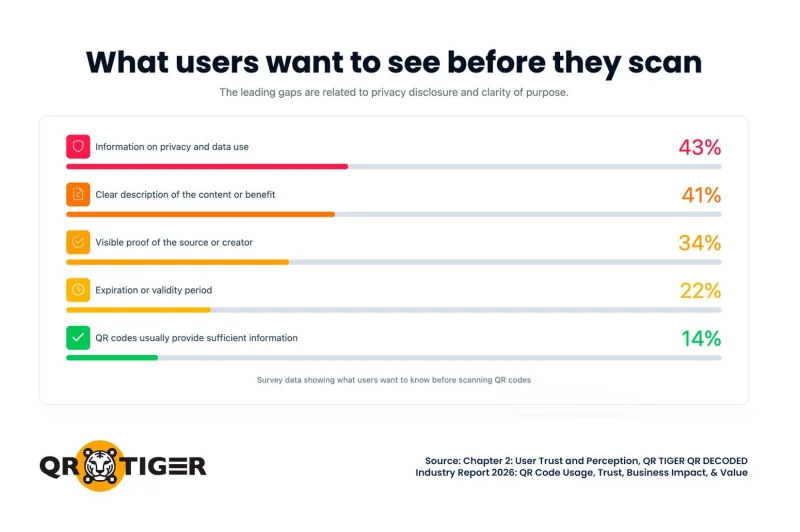
When it comes to using QR codes in marketing, adding a clear CTA helps communicate the code’s purpose in just a few words.
What makes a good QR code CTA?
A good QR code call to action not only convinces people to scan but also clearly describes where the code leads and how it benefits them. A CTA is good when it:- States a value: People decide in seconds whether a scan is worth it. Naming the payoff, like a discount, or even just the educational content it leads to, gives them a reason to reach for their phone.
- Sets an expectation: A CTA like “Watch our demo” tells people what will load. This way, the landing page doesn’t come as a surprise.
- Builds trust: A CTA that accurately previews the destination shows people the code leads where it says it will.
The classic “Scan me” QR code frame is a safe starting point, since it signals that the code is meant to be scanned.
However, it doesn’t say enough about what people get or why it’s worth scanning, so add a custom phrase like “Get 50% off” to the frame to tell people what they’ll get.
How do you write a QR code call to action?
To write an effective QR code call to action (CTA), tell people what they’ll get when they scan the code and what action to take. Keep the wording short, specific, and relevant to the QR code’s destination.Here are 9 CTA formulas you can follow for your campaigns:
1. One bold word
When the offer is the whole message, one word is enough. Popular clothing brands and businesses can place large QR codes outside their stores with a single word, such as “Sale,” on their frame, leading shoppers straight to discounted items in their online store.
However, this formula only works if the setting already gives people a clear idea of where your QR code will lead (like a “Sale” call-to-action QR code on your store window) and if your brand is one your audience already trusts.
Use this for promos that people already understand at a glance. Try “Sale,” “Free,” or “Deals” in large, bold letters on the frame. If the QR code is placed anywhere that does not provide the same context, a full CTA like “Claim discount” is a better fit.
2. A relatable, personal hook
A relatable CTA can help it sound more personal and less like an advertisement. Music and entertainment brands can build their messaging around everyday moments, enticing audiences to try their brands by offering playlists for niche topics like rainy Sundays or long drives.
Write the CTA in the reader’s voice or around a moment they recognize. Try “Show me,” “Sign me up,” or “Show playlist.”
3. Benefit + no-risk promise
The fastest way to remove hesitation is to answer the objection before the reader raises it. Streaming services and subscription apps can pair their sign-up QR codes with “Cancel anytime,” letting people know there’s no risk in trying.
Use this for subscriptions, trials, and sign-ups: place “Try it free” on the QR code frame, or add “Join free, cancel anytime” beside the QR code. It’s especially useful when your QR code leads to a form that asks for personal details.
4. A bold promise + a low-commitment action
A confident headline does the selling, so the CTA only needs to make the next step easy. Software companies and website builders can print a bold promise on their flyers or booth banners, then frame the QR code with a call to action, such as “Join for free” or “Get started.”
On printed materials, the promise goes in the surrounding copy, and the action goes on the frame. For example, “Build your guest list in minutes” above a QR code framed with “Get started.”
5. The exact reward
Name a specific reward instead of offering a vague promise. Retailers and online shops can print their referral or loyalty reward directly on the frame, such as “Get $5 credit,” so shoppers know exactly what they’ll get before scanning.
If the offer applies only to certain items, you can also include the category, such as placing “Shop 30% off” on the frame and adding “Up to 30% off holiday decor” beside the QR code.
Try adding “Get $10 off” or “Free coffee” on the frame, and place longer ones like “Refer a friend, get $25” in the area beside it. Make sure the scan opens that exact discount, not just the homepage.
6. Verb + campaign name
Turning the campaign name into the CTA makes it easy to remember.
Fashion brands can put QR codes on seasonal displays with lines like “Shop the Summer Edit,” linking shoppers to the full collection.
This works well for seasonal launches and named promotions. Try “Scan to join Taco Tuesday” or “Explore our Holiday Collection.”
Campaign names often run past 15 characters, so put a short action like “Shop now” on the frame and print the full campaign line beside the QR code.
7. Offer + deadline
A deadline gives people a reason to act now instead of later. Department stores can pair holiday promo QR codes with “Take an extra 20% off” and a printed end date to push shoppers to scan before the sale closes.
Put the offer on the frame itself, such as “Claim 20% off,” and add the deadline “Sale ends this Sunday” next to the QR code. Only use it when the deadline is real.
8. Verb + specific content
The more specific the CTA, the easier it becomes for people to decide whether scanning the QR code is worth it.
Brands that are promoting videos, guides, or product details can specify exactly what the QR code links to, such as “Watch the demo” or “Read the guide.”
This works well for video, product information, and downloadable content, since it tells your audience exactly what kind of content to expect when they scan it.
9. Curiosity + payoff
A little mystery can get people to scan, as long as it is used correctly.
Brands launching new products can promote them online with teaser images featuring a QR code and a CTA that says “Scan to reveal” or “See what’s next.” The goal should be to make the audience curious and give them a reason to scan.
If you plan to do this, make sure the QR code's content is worth the wait. Otherwise, your audience will lose interest quickly.
Tips for making a custom call to action for your QR code
When making calls to action for your own campaigns, keep these tips in mind:
- Start with a verb: Words like “Scan,” “Get,” “Watch,” and “Claim” tell people exactly what to do next.
- Name the destination or reward: Doing so helps people immediately understand what the QR code is meant for.
- Keep the frame text under 15 characters: QR code frames have limited space, and people often read them from a distance or in passing. For longer CTAs, place the copy next to the code.
- Match the CTA to the destination: If a CTA promises 20% off, scanning the QR code should take users directly to the discount page, not your homepage.
- Add urgency only when it’s real: Deadlines like ‘Ends Sunday’ can push people to act, but only use them if the deadline is true. Fake urgency, like a countdown that resets or an offer that never actually ends, can erode audience trust, reducing the number of people willing to participate in your future campaigns.
Once your CTA is live, you can track its scans and what people do after scanning, then adjust the wording or placement as part of the QR code optimization process.
What call to action works for different QR code use cases?
Here are example CTAs for common QR code use cases, with a tip for each:
Use case | Example CTAs | Tip |
Social media | Follow us, Find us online, See our socials | If the Link Page QR code leads to one platform, put “Follow us” on the frame and the platform’s name or logo beside it. |
Video advertisements | Watch trailer, See our demo | Hint at what kind of video will play once you scan the Video QR code, like a trailer, demo, or tutorial. |
Sales and promos | Get 20% off, Get vouchers, Shop the sale | Put the exact discount in the CTA so shoppers know how much they’ll save before scanning. |
Website | Save your seat, Scan to shop, Add to wishlist | Name the exact page people will land on after scanning the URL QR code, like a reservation form or your online shop. |
Feedback | Rate us, Leave a review, Share feedback | Only reward private surveys, since Google doesn’t allow incentives for public reviews. Place “Free drink” on the frame and the full offer beside the code. |
File | Get the eBook, Grab your copy, Get the PDF | Name the format (PDF, Word, Excel, etc.) your File QR code leads to so people can decide if it’s worth downloading. |
Mobile App | Get the app, Scan to install, Install now | When making an app store QR code, add your app’s name, like “Get [App name] free,” only if it fits within 15 characters. |
Newsletter | Sign me up, Join our list | State what subscribers get and how often, like “Weekly deals by email,” beside the code. |
Digital business cards | Save my contact, Let’s connect, See my details | Keep it a one-step action so saving your contact feels quick. |
Landing Pages | Get the details, Explore offers, Event schedule | Match the CTA to the main purpose of the custom QR code landing page, whether that’s a promo, launch, or event. |
Wi-Fi | Free Wi-Fi, Join our Wi-Fi, Get online | Place the code where guests wait, and print the network name beside it so no one joins the wrong one. |
Event registration | Register here, Volunteer now, Save your spot | Make it clear people are signing up, not just reading about the event. |
How do you add a call to action to a QR code?
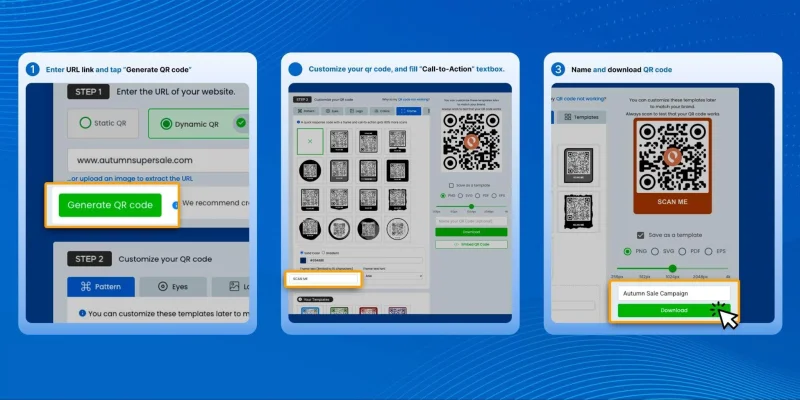
Follow these steps to add a call to action to a custom QR code:
(Note: QR TIGER's frame text holds up to 15 characters. For longer CTAs, place them in the text accompanying the QR code.)
1. Go to QR TIGER QR Code Generator and select the QR code data type. Enter the required data or links, then click the “Generate QR code” button.
2. Personalize your QR code by changing the colors, eye shapes, and patterns. Don’t forget to add a logo for branding.
3. To add a call to action on the QR code design, go to “Frame” and add a frame text (up to 15 characters) on the provided field. Then choose a font style.
4. Use the preview to test scan the custom QR code. If it doesn't scan, increase contrast or simplify the design.
5. Download your QR code image in PNG or SVG. Share it digitally or print it along with your physical marketing materials.
Which brands are using a call to action in QR code campaigns?
Here are three brand campaigns that used a QR code CTA:
Coca-Cola “Share a Coke” (2025)
Coca-Cola brought back its “Share a Coke” promo in 2025, including a QR code on the product packaging.
The company encouraged its audience to scan the QR code on the pack or point-of-sale display to reach the Share a Coke digital hub if they couldn't find their name in-store.
Once scanned, the QR code led users to a digital hub, where they could customize Coca-Cola packaging with additional names and create personalized videos and memes through the Share a Coke Memory Maker.
Capri Sun’s “Slurp and Win” sweepstakes (2024)
Capri Sun teamed up with Nintendo to feature popular characters from Mario Kart 8 Deluxe, Animal Crossing: New Horizons, and Pikmin 4 on its cartons and pouches, along with a QR code and a CTA inviting fans to scan for a chance to win a Nintendo Switch.
The CTA on the QR code made it clear that scanning gave fans a chance to win one of 500 Nintendo Switch OLED systems plus a digital game download code. The limited-edition packs were also on sale for a limited time, giving fans a reason to scan before the promo ended.
Fans could earn up to 10 bonus entries by uploading a Capri Sun receipt, and a backup website was listed for anyone who couldn’t scan.
McDonald’s x Frank’s RedHot teaser (2024)
McDonald’s and Leo Burnett UK launched an outdoor campaign to build hype for their collaboration with Frank’s RedHot sauce, offering fans a taste of the limited-edition burger by placing cryptic QR codes in their ads.
Curious fans could scan the code to receive a top-secret passcode for the delivery site, where they could claim their tasting box.
Add a call to action to your next QR code with QR TIGER’s free generator
Every QR code call to action should tell people exactly what they’ll get, and the scan should deliver exactly that.
Create a custom QR code for free with QR TIGER, or sign up to use dynamic QR codes and track which CTA gets more scans.
This article is for general informational purposes only and does not constitute legal, financial, or other professional advice. For questions about QR TIGER's products or services, please contact our support team at it@qrtiger.com.
Frequently Asked Questions (FAQ)
Does every QR code need a call to action?
Should my call to action be in my customers’ language?
Can I change my QR code’s call to action after printing?
Does adding a CTA frame affect how the QR code scans?
How can I tell if my QR code call to action is working?
Was this article helpful?
Maximize Scans with the Best QR Code Generator
Join thousands of global brands using QR TIGER to manage dynamic routing, bulk creation, and deep attribution analytics.
Get Started For Free