
A Guide to Creating a White QR Code That Actually Works

A white QR code uses white for the data modules and a dark-colored background. It’s the opposite of the usual black-on-white QR code.
In this guide, we explain:
- how a white-colored QR code works,
- how to create one that scans,
- the design rules and best practices to follow,
- the best time to use it (and when to avoid), and
- lessons from real-life campaigns using a white-colored QR code.
Let’s dive right in.
Table of Contents
- Can a QR code be white?
- How can I make a white QR code?
- 5 Best practices for creating a white color QR code
- Important considerations when using white and transparent QR codes
- When should you use white-colored QR codes?
- When should you avoid a white-colored QR code?
- Real-life use cases of white QR codes that work
- Create your first white QR code with the best QR code generator
- Frequently asked questions about QR code colors
Can a QR code be white?
Yes, a QR code can be white or have white patterns. For it to work, it must be placed against a dark background, such as black, dark brown, dark blue, or other dark colors. This makes the patterns more visible and easier for scanners to detect.
Using a creative QR code design like this can be tricky if not done right.
For reliable scanning, maintain a high contrast between the QR code and its background, and always test the QR code by scanning it with your smartphone camera under different lighting conditions.
When you create a QR code at QR TIGER, you can use the live preview on the right side of the panel to check the contrast ratio and test its scannability.
You May Also Read: 25 Reasons Your QR Code is Not Working and How to Fix Them
How can I make a white QR code?

To make a white QR code PNG, follow this step-by-step guide:
1. Open a dynamic QR code generator on your browser.
2. Select the link to QR code or other solution.
3. Enter the necessary information to encode.
4. Click, ‘Generate QR code.’
5. Customize the QR code:
- Choose any white shade as foreground color (color codes: #FFFFFF, #FFFDD0, or #FAF9F6)
- Select a dark background color (color codes: #000000, #00008B, or #8B0000)
- (Optional) Check the box under background for a white QR code with transparent background.
- Choose a bold pattern, eye shape, and frame.
- Add a logo.
6. Test your QR code to ensure it's scannable.
7. Download the QR code in PNG format.
Dynamic QR codes let you edit their content and design after generating them. Marketers and businesses also use them to track campaigns and remarket to their audience. Sign up and create three dynamic QR codes for free!
5 Best practices for creating a white color QR code
Keep these best practices in mind to guarantee the scannability of the QR code:
1. Deep contrast between the background and data modules
When choosing a white foreground for your QR codes, remember to pair it with a darker background. Why? It makes your QR code easier to spot and scan.
You can try out some of these color combinations that are highly reliable, modern, and brand-friendly:
- White + deep charcoal (#1F1F1F)
- White + matte black (#000000)
- White + navy blue (#0B1F3B)
- White + dark forest green (#0B2E1A)
- White + deep burgundy (#3A0F1A)
2. Remember the quiet zone
The quiet zone is the area around a QR code that separates it from its surroundings. This ensures the QR code is isolated from anything that could interfere with its pattern.
Always make sure there is a gap between your QR code and any graphics you mix it into.
3. Avoid using overly colorful or patterned backgrounds
According to Reboot Online, consumers are 81% more likely to remember the brand color than remember its name. This means that the colors you use in your branding will determine how quickly you are recognized.
A colorful QR code generator lets you choose any color for your QR codes, and many offer the option to use a colorful or patterned background.
However, if you're using white for your QR code’s patterns, a very busy, colorful background may make certain parts of the code difficult to scan. To ensure it works, avoid using these types of backgrounds.
4. Use the highest correction levels
To ensure that dirty or damaged QR codes remain scannable, the creators of the 2D barcode added an error-correction feature. This feature includes additional data modules that will help a scanner restore a portion of the data.
A high error correction level on a white QR code means that, no matter how much dirt or scratches it receives, its content remains accessible by scanners.
5. Always test your QR code
After choosing your background colors and high correction levels, test your QR code by scanning it from your screen.
This helps you avoid wasting time and/or ink, maintain the sustainability of your business, and remain reliable to your consumers.
You should also test your QR code after integrating it into your graphics and print a sample before printing and deploying a large number.
Important considerations when using white and transparent QR codes
Keep in mind the following factors if you intend to use white and/or transparent QR codes:
- Branding: Color affects audience perception emotionally. Consistent use of brand colors makes your business more recognizable and trustworthy. Consider how white-colored QR codes look with your brand. Will it match your visual styles and colors?
- Lighting: Lighting in the QR code’s environment can cause scanning issues. Light can reflect off white surfaces, making a white QR code look washed out and difficult to scan.
- Insufficient device/camera quality: Our industry research highlights that device or camera quality hinders 39% of people from scanning QR codes. Consider this factor before deciding on white as the color for your QR codes’ data modules.
- Accessibility and inclusivity: White QR codes can be difficult to spot with the naked eye. If its content must be shared, such as for public, healthcare, transportation, or government purposes, it would be better to design QR codes with bold colors instead.
- Printing issues: Dark QR code backgrounds use more ink than light ones. Because of this, printers with insufficient ink can leave parts of the material printless, altering the original data modules.
You May Also Read: Colored QR Codes: How to Color Them Correctly
When should you use white-colored QR codes?
White QR codes are best used on designs or materials with dark colors, like the following:
- Minimalist branding
- Dark product packaging
- Dark-themed marketing
- Dark-colored apparel
- Dark mode on digital displays and interfaces
When should you avoid a white-colored QR code?
Avoid using white-colored QR codes in:
- Ads under uneven lighting
- Designs with colorful and patterned backgrounds
- Materials with glossy, metallic, reflective surfaces
- Campaigns with a limited budget for printing
Real-life use cases of white QR codes that work
These real-life examples can serve as your guide and inspiration on how to design and place a white-colored QR code in your materials.
Mountain Dew’s gaming QR campaign

Mountain Dew and the MOBA game Mobile Legends Bang Bang used QR codes to run their collaborative promotion. Each soda bottle features a white on black QR code.
Without changing their distinct brand colors, Mountain Dew colored the QR codes white to highlight them against their black-and-green labels. This made the codes easier to spot and scan, resulting in a smoother reward process for gamers.
Takeaway: Design your QR code so it's instantly recognizable in any visual environment.
Poppi’s Super Bowl QR code

The Poppi Soda QR code sweepstakes campaign gave sports fans the chance to be at the nation’s greatest sporting event: The Super Bowl.
Following the brand’s warm, vibrant colors, with its name in white, Poppi also made the QR code on the cans white, making it a consistent part of the product.
The QR code led to a site where people could submit their entries to the sweepstakes.
Takeaway: When QR codes sit on already high-saturation packaging, switching the QR code to a high-luminance color (like white) can preserve brand identity while improving its scannability.
Jameson Black Barrel’s Father's Day songs

Jameson celebrated Father’s Day in a special way through QR codes and Artificial Intelligence (AI).
The cream-colored QR code on the Jameson Black Barrel box’s black exterior made it pop and easy to locate and scan.
The short call-to-action, “Scan Here,” also made the entire experience more friendly. This gave consumers the opportunity to create a memorable greeting as a song.
Takeaway: On dark, premium packaging, softer “off-white” tones can deliver strong scanability while feeling more brand-aligned.
Halo’s drone QR code
During a marketing campaign for the Halo TV series, Paramount+ launched a drone stunt at the South by Southwest (SXSW) Festival in Austin, Texas.
The network used 400 drones to form a QR code in the night sky in their promotion. Against the clear night sky, the white drone lights made the QR code pattern visible and scannable.
Those who scanned it were taken to the upcoming show's trailer, creating buzz at the event.
Takeaway: The surrounding environment (light, distance, perspective) can impact how the QR code and the entire campaign work.
The Artist Project’s word QR codes
The Artist Project, an art fair in Toronto, Canada, had an ingenious idea to promote the event in 2023. Collaborating with the creative agency The Local Collective, the promotion involved QR codes in different colors deployed throughout the city.
The twist? Each QR code was entirely made up of words.
Many of these QR codes were white with a colored background, adding to the artistry of the whole promotion.
The QR codes are all functional and direct people to specific artists and their portfolios, as well as to ticket purchases for the fair, without a hitch.
Takeaway: You can push visual creativity as long as the QR code’s structure remains intact. When their forms are thoughtfully integrated, you can create an entirely different kind of art.
Adidas and the Billboard Run QR codes
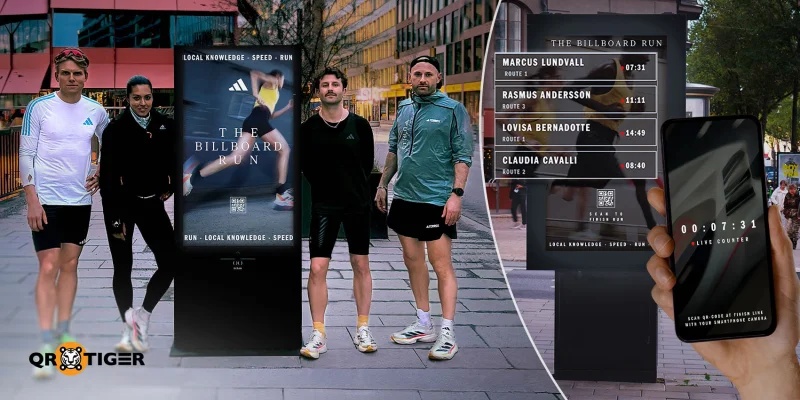
In an interactive campaign in Stockholm, Sweden, Adidas held a running event to promote its gear, sports, and health. Known as the Billboard Run, the campaign used white QR codes placed on dark gray to black billboards across the city.
By choosing one of four starting QR codes, runners could access an app that let them track their progress by scanning the other billboard codes along the path. Each scan tracks the fastest runners, with the winners receiving Adidas products at the end of the event.
Takeaway: In environments where users are on the move, white QR codes can be a practical choice for outdoor advertising when paired with sufficiently dark backgrounds.
Nike’s Interact Run “Black” sneakers
Nike used white QR codes to promote sustainability with its new Interact Run “Black” sneaker line.
By placing the QR code on the tongue of its black shoes, the brand made its content easy to find.
The QR code directs people to information on the company’s sustainability goals, details from their Care-Repair program, and instructions on how to recycle or donate their sneakers at the end of their life.
Takeaway: When color, placement, and purpose are intentionally aligned, a white-colored QR code becomes a seamless extension of your product and your brand story.
Create your first white QR code with the best QR code generator
White QR codes look elegant and align with premium branding. They perform best when the background is consistently dark, the lighting is controlled or predictable, and the design is clean and minimal.
But like any colored QR code, they can perform poorly when placed in visually noisy, low-contrast, or reflective environments.
To ensure your QR codes are high-quality, on-brand, and functional, we recommend using a dynamic QR code generator like QR TIGER.
Over 850,000 brands worldwide trust us for their QR code needs. Try our generator for free by creating an account. No credit card details required!
Frequently asked questions about QR code colors
Does a QR code have to be black and white?
No, QR codes don’t have to be black and white. They can be any color, provided their foreground and background colors have sufficient contrast.
Can I change the color of a QR code?
Yes, many QR code generators allow users to change the color of QR codes they design. However, this won’t change the colors of codes that have already been printed or deployed.
How to change QR code color to white?
To change the color of your QR code, simply visit the generator used to create it, find the design you wish to edit, and change its foreground color to white.

