
qr code generator

Products

  • Bulk QR Code Generator
  • QR Code Generator API
  • QR Code Generator for Enterprise
  • Digital Business Cards for Enterprise
  • MENU TIGER

Solutions

Industry

  • QR Codes for Restaurants
  • QR Codes for Marketing
  • QR Codes for eCommerce
  • QR Codes for Education
  • QR Codes for Logistics
  • QR Codes for Events
  • QR Codes for Real Estate
  • QR Codes for Manufacturing
  • QR Codes for Healthcare
  • QR Codes for Travel

Resources

  • Link to QR Code
  • PDF to QR Code
  • QR Code for Instagram
  • Location QR Code Generator
  • YouTube QR Code
  • Social Media QR Code Generator
  • SMS QR Code Generator
  • Email QR Code Generator
  • MP3 and Audio QR Code Generator
  • Facebook QR Code
  • Pinterest QR Code
  • Text QR Code Generator

Learn

  • QR Decoded: 2026 QR Code Industry Insights Report
  • BLOG
  • eBooks and Webinars
  • Apps and Integrations
  • Video Tutorials and Podcasts
  • QR TIGER vs Other QR Code Generators
  • Products
  • Solutions
  • Learn
  • Pricing
  • FAQ
Log InRegister
User profile
Engkeyboard_arrow_down
Select your language

Afrikaans

عربي

Bangla/Bengali

Dansk

Deutsch

Eng

check

Español

Greek

Finnish

Français

हिन्दी

Indonesian

Italiano

日本

Javanese

Hungarian

한국어

Melayu

Dutch

Norsk

Punjabi

Polish

Português

Romanian

Pусский

Svenska

Tamil

ไทย

Türk

Urdu

Tiếng Việt

简体中文

繁體中文

close
Stay in the loop
Sign up for our newsletter and be the first to hear about promos, updates, and tips
Join the community

Download the QR TIGER App

Create and scan QR codes on the go
we chat official qr codesocial media qr code
Resources
How do Dynamic QR codes work
Multi URL QR Code
Digital Business Card QR Code
Bulk QR Code Generator
How to make a QR Code for an Image
How to create a QR code for a video
How to create a QR Code for Google Form
How to Create a QR Code with Logo
How to track QR code with Google Analytics
How to make QR code for Restaurant Menu
File QR Code Convertor
  • FAQ
  • Contact Us
  • Help Center
  • it@qrtiger.com
  • About Us
  • Status
  • Enterprise Solutions
  • Pricing
  • Terms and Conditions
  • Terms of Acceptable Use
  • Privacy Policy
  • Cookies Policy
qr code generator
This QR Code generator is a registered trademark of QR TIGER INCORPORATED LIMITED.
'QR Code' is a trademark of DENSO WAVE INCORPORATED. © 2026 www.qrcode-tiger.com

Create a QR code for Google Forms

  • URL
  • vCard
  • File
  • Link Page
  • Google Form
  • Menu
  • App stores
  • Landing page
  • Smart URL
  • GS1 Digital
  • MP3
  • Video
  • Wifi
  • Email
  • Event
  • Facebook
  • Youtube
  • Instagram
  • Pinterest
  • Tiktok
  • Twitter
  • Location
  • Text
  • SMS
  • Less
  • More
  • Enter the URL of your Google Form   
    Learn how to track data with dynamic QR codes
    We recommend creating a dynamic QR code if you want to track performance and edit data even after printing.
    Customize your QR
    Why is my QR code not working?
    Pattern
    Eyes
    Logo
    Colors
    Frame
    Templates
    free qr code
    Trusted by more than 850,000 brands since 2018Read our customer success stories
    Google forms QR code

    Advanced QR generator for Google Forms

    Create a QR code for Google Forms to streamline sharing. Make your survey, quizzes, registration, attendance, medical, and check-in forms accessible with a scan

    What is a Google Forms QR code?

    A quick response code for forms lets you share your online form with a wider audience. This is ideal for use in events, conferences, and printed materials. The possibilities are endless—you can link the QR to a survey, customer feedback, application form, registration, quizzes, and more. No need to manually share or type the URL.

    Icon

    Target who’s likely to send a response

    Make your online forms instantly accessible and collect more responses. Our QR allows your target respondents to access your forms and respond on mobile devices.

    Icon

    Google Forms + QR TIGER

    Digital forms and QR codes are the ultimate duo you need to collect responses from online or offline audiences.

    Why use a QR code for Google Forms

    Instantly share your online forms using the best QR code generator

    Icon

    Free Google Forms QR code

    Download, customize, and edit your QR without spending a single dime
    Icon

    Built with advanced features

    Dynamic means your QR comes with advanced built-in tracking, retargeting, and analytics tools to let you create future-proof campaigns.
    Icon

    One QR code for different forms

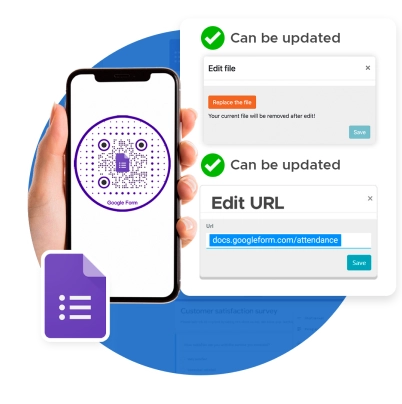
    Edit the link on your code any time. No need to create another QR for new campaigns or forms.
    Icon

    View scan activity in real-time

    Our built-in tracking feature lets you see the scan performance of each QR. This lets you refine your setup and placements.

    Why top brands choose QR TIGER

    What makes us your best option for phygital solutions

    Branded QR codes for Google Forms

    Customize your QR with your brand scheme and logo. This increases your scan rate by 40 percent

    Complete QR code provider

    Our robust software offers more than 20 specific solutions that address all your business needs. Get access to a wide range of advanced applications and features in one QR code platform.

    Detailed analytics

    Track your QR engagement in real-time. See the count, dates and times, locations, and devices used to scan.

    Works with tools you love

    Connect your QR TIGER dashboard with platforms like Zapier, Canva, Hubspot, Monday.com, and more.

    Trusted support system

    Our customer success team is online 24/7 to respond to your queries and make sure things work on your end.

    Proven scannability

    Reach maximum output without interruption with our platform’s rapid auto-scaling server clusters and 99.9% service uptime.

    QR TIGER has Enterprise-grade plans built for large-scale QR code applications. Talk to us to learn more.
    BOOK A DISCOVERY CALL

    Frequently asked questions

    What is a Google Forms QR code?

    A QR Google Forms is a widely used solution that lets you share instant access to , questionnaires, user information, feedback, and more.

    Can I get a QR code for a Google Form?

    Yes, you can make your own form QR online. Use QR TIGER to generate a unique code for your digital forms.

    How do I make a quick response code for a Google Form?

    and choose the Google Forms QR solution. Copy the shareable Google Forms link and enter the URL into our software. Select Static or Dynamic and generate your code. Once done, customize it and download it.

    Can I create a QR code for Google Form for free?

    Yes. Use the best free QR code generator to create a form QR code for free. When generating your code, choose Static QR.

    What is a Google Forms QR code generator?

    A Google Forms QR maker is a platform with one specific function: to convert a Google Form to QR code to collect responses easily. It also stores in one place, allowing users to edit, track, and manage all generated codes.

    How does a Google Form QR work?

    This QR solution can be static or dynamic. It works by converting the Google Forms link into a unique code, making it a smartphone-readable source. People can instantly access the online form with just a quick scan of your using their device.

    Why do you need a quick response code for Google Forms?

    Share online forms with no hassle. Reduce manual errors, update forms whenever you want, track engagement in real-time, and collect responses from your target respondents in just a quick scan.

    How do I use a Google Forms QR?

    You can use it to share online forms to collect responses, such as surveys, customer feedback forms, quizzes, registration forms, and application forms. You can even use a to record attendees easily.

    What can I store in a Google Forms QR?

    This solution can store Google Form links. Dynamic ones can store different links at a time by replacing the stored link with a new one.

    Can I edit the stored link in a Google Forms QR?

    Absolutely. You can using a dynamic QR maker. When generating your code, make sure to select Dynamic QR. This allows you to edit the stored Google Form link anytime and provide your target respondents with a fresh online form.

    Can I add a logo to my QR code Google Forms?

    Yes, you can create a using our QR code generator with logo integration. You can choose your QR’s eyes, pattern, frame, and colors and add a logo.

    How do I add a logo to my Google Forms QR?

    integration. Upon customization, click Logo and upload your image file. Once complete, click the image to attach to your generated code.

    Can I customize my QR code’s design?

    Definitely. Our free QR platform allows you to create your own . You can select colors, eyes, patterns, and a frame and add your logo that matches your brand or personal style.

    Can I edit a QR design?

    Yes. You can edit your QR design using a dynamic QR maker. Our dynamic QRs have an feature. You can modify or change your existing code’s design anytime to match it with your current campaign.

    Is the Google Forms QR solution trackable?

    Yes, our dynamic Google Form QRs have a built-in feature. Therefore, you can track and monitor engagement in real time.

    How do I track my Google Forms QR?

    To track your Google Forms QR, simply go to your account dashboard. Select the QR you want to track and click Stats to see the analytics. Here, you can see how your specific QR campaign performs based on the scan activity.