

What is a WhatsApp QR code and how does it work?
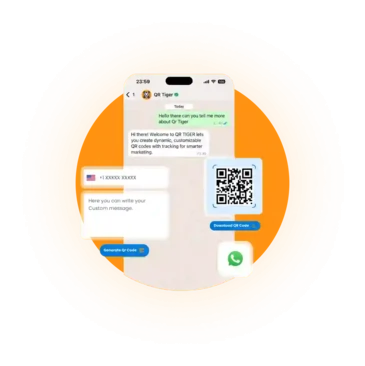
It’s a scannable code that instantly opens a new chat in WhatsApp with your details in one scan. It displays your phone number and a pre-filled message so people can send the message hassle-free.
How to Create a WhatsApp QR Code
It only takes less than a minute to create your own. Here’s how easy it is:

Enter Your WhatsApp Number
Add your phone number including the country code for global connectivity.

Write a Pre-Filled Message
Compose a default message like “Hi, I'd like to know more!” to break the ice.

Generate & Customize
Click generate to create your QR code instantly. Download it as premium PNG.

Share & Get Notified
Place the code anywhere. When scanned, a chat opens and you're notified.
Why use QR TIGER to make WhatsApp QR codes
Our users know that we’re more than just a QR code generator. Here’s what you can do with our platform:

Create once, update anytime
Don’t start over every time something changes. Edit your QR code even after your QR code is printed and live.
Know what’s driving results
On your dashboard, see how your QR code performed at a glance. Learn what’s working so you can improve as you go.
Manage more than just WhatsApp
Everything sits in one place. You can create, track, manage, and organize different QR campaigns without juggling multiple tools.
Built to stay reliable
When someone scans your code, it should just work. Our platform is built to handle that, so you don’t lost opportunities.
How different industries use WhatsApp QR codes
Its use cases fit naturally into different industries. But the goal is always the same: make it easier for people to start a chat without friction.
Small and Medium Businesses
Let customers reach out to you right away while interest is still high. Use it to handle quick product questions, order inquiries, updates, or after-sales support.
Retail and E-commerce
It serves as a direct line to your business. Customers can ask about the product, confirm details before buying, or request help with returns or exchanges.
Restaurants and Food Businesses
Use the code so customers can place orders, request takeouts, book a table, or send feedback after a visit via WhatsApp. This lets them reach out without calling or waiting.
Service professionals
Make it easy for potential clients to contact you on the spot. Add it to your business cards or portfolios to connect, answer questions about services, and share rates and availability.
Events and Marketing Teams
Give people a quick way to reach out while they’re engaged. Use it for registrations, RSVPs, sending event updates, reminders, and answering questions during the event.
Customer Support Teams
Let people can go straight to WhatsApp chat for issues or complaints. Provide real-time support and answer queries straight away.
Frequently asked questions
How does the chat notification work?
It’s simple. Someone scans your QR code and WhatsApp opens a new chat displaying your number and custom message. The moment they send a message, you’ll receive it just like any other WhatsApp conversation on your phone.
Can I customize the prefilled message?
You, you have full control over it. You can set the exact message people see when they scan your code. It can be, “Hi, I’m interested in your services” or something more specific tied to your campaign or event.
Does it need an internet connection to work?
The QR code itself doesn’t need an internet connection to be displayed on print or a screen. But once someone scans it, they’ll need to be connected to an internet to open WhatsApp and send the message.
Can I change the phone number after generating?
Yes. If it’s a dynamic QR code, you can change the phone number or edit the message after creating or printing it. Simply edit it from your dashboard. But if it’s a static QR code, the information inside it is fixed or permanently stored. So if you need to update the info, you’ll need to create a new QR code with the new details.
Can any phones scan this QR code?
Yes, any modern smartphone with a camera will work. iPhones and Android phones can scan QR codes directly using their built-in camera. If not supported, user scan install a free QR code reader app.
Where should I place my WhatsApp QR code?
Place it wherever it makes it easy for people to start a conversation with you. Common spots include business cards, product packaging, posters, banners, flyers, menus, receipts, and displays.
Download the QR TIGER App



'QR Code' is a trademark of DENSO WAVE INCORPORATED. © 2026 www.qrcode-tiger.com